Managing a vacation rental involves much more than listing a property online and welcoming guests. Small property managers often handle reservations, guest communication, cleaning schedules, payments, maintenance requests, and calendar updates themselves. When these tasks are spread across different platforms, it becomes difficult to stay organized and respond quickly to guests.
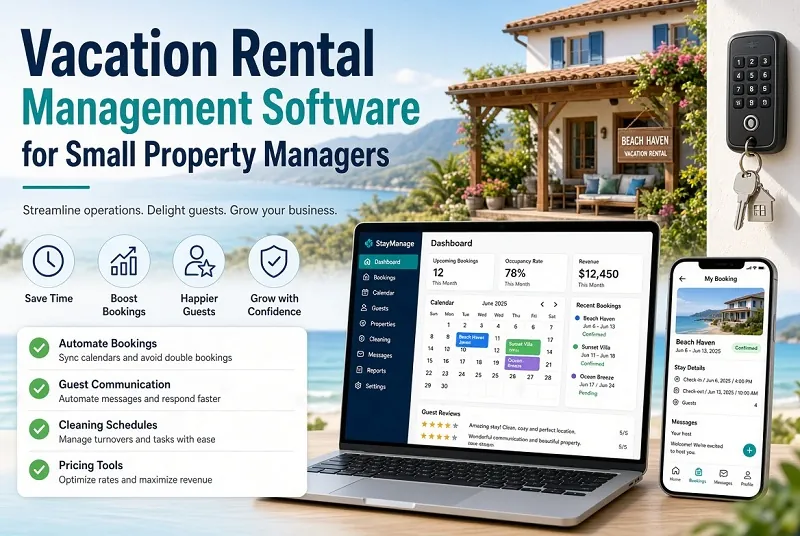
Vacation rental management software helps bring these everyday responsibilities into one system. Depending on the platform, it may include reservation management, automated guest messages, booking calendars, payment tracking, housekeeping coordination, and reporting tools. Instead of manually checking several accounts, property managers can use a central dashboard to monitor important activities.
For someone managing two, five, or ten properties, this organization can make a meaningful difference. It can reduce repetitive administrative work, help prevent scheduling mistakes, and create a more consistent experience for guests. However, not every property manager needs an advanced system with dozens of features.
The right solution depends on the number of properties, booking channels, team size, and daily workload. A small operator should prioritize tools that solve current problems without creating unnecessary complexity. Choosing software that fits the business can help save time, improve organization, and make future growth easier to manage.
Essential Features to Look for in Vacation Rental Software
Before choosing vacation rental management software, identify the tasks that consume the most time in your business. This helps you compare tools based on practical value rather than impressive feature lists.
A centralized booking calendar is one of the most useful features. It allows managers to view reservations, availability, check-in dates, and check-out dates in one place. If the software supports synchronization across booking channels, it can also help reduce the risk of double bookings. Always confirm which platforms are supported and how frequently calendar updates occur.
Guest communication tools can save additional time. Some systems allow managers to schedule messages containing check-in instructions, property information, and departure reminders. Templates can reduce repetitive typing while helping guests receive important details at the right time.
Housekeeping and maintenance coordination are also important. A useful system should make it easy to track cleaning tasks, report property issues, and communicate responsibilities to team members or contractors.
Other features may include payment tracking, expense records, performance reports, and owner statements. These tools can be valuable, but their importance varies by business.
Small property managers should start with essential features and expand only when necessary. The best software is not necessarily the platform with the longest feature list; it is the one that makes daily operations easier and more reliable.
How Booking Automation Can Reduce Daily Work
Manual booking management can become difficult when reservations arrive from several websites. Managers may need to update calendars, send confirmation messages, organize cleaning, and prepare properties for incoming guests. Repeating these tasks for every reservation creates opportunities for delays and errors.
Vacation rental automation can handle some of this repetitive work. Depending on the software, a new reservation may trigger a guest confirmation, update a connected calendar, or create a housekeeping task. Scheduled messages can provide check-in information, explain property rules, and remind guests about departure procedures.
Automation is particularly helpful for small teams because it reduces the number of routine tasks that require personal attention. A manager can spend less time copying information between platforms and more time addressing guest questions, inspecting properties, and improving the rental experience.
However, automation still requires careful setup. Message templates should contain accurate instructions, and scheduled messages should match the property's check-in and check-out policies. Managers should also review calendar synchronization settings and understand what happens if a connected platform becomes unavailable.
Not every task should be automated completely. Guest complaints, unexpected maintenance problems, and unusual booking requests may require human judgment. A practical system combines automation for predictable tasks with personal support when guests need individual assistance.
Managing Multiple Booking Channels from One Dashboard
Many vacation rental owners advertise their properties on more than one booking platform. This can help reach different audiences, but it also creates a challenge: keeping availability, pricing, and reservation details consistent.
Property management software may include channel management features that connect supported booking platforms to a central dashboard. Depending on the system, managers can review reservations, update availability, and coordinate important booking information without logging into every account separately.
Calendar synchronization is particularly important. If a property is booked on one channel but remains available on another, a second guest could reserve the same dates. A suitable channel manager can help reduce this risk by sharing availability updates between connected platforms. Managers should check synchronization behavior, update frequency, and any limitations before relying on it.
Pricing management also deserves attention. Different channels may apply different fees, commission structures, or booking policies. Managers should understand how rate changes are distributed and whether they need to adjust prices directly on individual platforms.
Before purchasing software, confirm that it integrates with the channels your business actually uses. Do not assume that every platform is supported.
For small property managers, a reliable central calendar and clear channel connections can simplify daily operations. The goal is to maintain accurate availability and reduce manual work while retaining control over listing details and pricing decisions.
Guest Communication and a Better Rental Experience
Guest communication has a direct effect on the vacation rental experience. Guests may need information about parking, access codes, check-in times, Wi-Fi, local rules, or nearby facilities. When answers arrive late or instructions are unclear, even a well-maintained property can feel poorly organized.
Vacation rental management software can help managers deliver consistent information throughout the booking journey. Some platforms support scheduled emails, text messages, saved replies, and guest information pages. These features can be used to send booking confirmations, arrival instructions, and departure reminders without writing each message from scratch.
Consistency is especially useful for managers who handle several properties. A standard message template can cover common questions while allowing property-specific details to be added where needed. This reduces repetitive work and makes it easier to ensure guests receive essential instructions.
Automation should not make communication feel impersonal. Guests may have special requests, accessibility questions, or problems that require an individual response. Managers should make it clear how guests can reach someone when automated information does not answer their question.
Privacy is another consideration. Collect only the guest information needed to manage the reservation, use appropriate security controls, and follow applicable privacy requirements.
A good communication system helps guests understand what to expect before, during, and after their stay. For small property managers, this can improve organization while making hospitality easier to deliver consistently.
Understanding Software Costs and Choosing a Budget-Friendly Plan
Software pricing can vary considerably, so small property managers should compare the total cost rather than focusing only on the advertised monthly fee. Some providers charge a flat subscription, while others calculate pricing according to the number of properties, reservations, users, or features.
Start by listing the functions your business genuinely needs. If you manage two properties and handle most guest communication yourself, a basic booking calendar and automated messaging may be enough. A larger operation with multiple cleaners, maintenance contractors, and booking channels may need more advanced coordination tools.
Check for additional costs such as onboarding, payment processing, premium integrations, extra users, or optional services. Also confirm whether the subscription requires an annual commitment and what happens if you decide to cancel.
A free plan or trial can help you evaluate a platform before paying, when available. Use this period to test the actual workflow: connect a calendar if supported, create a sample reservation, prepare a guest message, and review the reporting tools. Confirm any trial limitations before moving important business operations into the system.
Consider the time saved as well as the subscription price. Software that reduces booking mistakes and repetitive administration may offer value beyond its monthly cost. However, avoid paying for advanced features you are unlikely to use.
The best budget-friendly option balances essential functionality, transparent pricing, ease of use, and room for future growth.
Common Mistakes When Selecting Property Management Software
One common mistake is choosing software based entirely on the number of features it offers. A complicated platform can create more work if its interface is difficult to understand or its tools do not match the business's daily needs.
Another mistake is ignoring integration requirements. If the software cannot connect with the booking channels, accounting tools, or payment systems you already use, you may still need to transfer information manually. Verify integrations before subscribing and ask whether additional charges apply.
Managers should also pay attention to onboarding and customer support. Check whether setup instructions, training materials, and technical assistance are available. This is particularly important for small businesses without a dedicated technology team.
Data security and account access deserve careful consideration, too. Review user permissions, account protection options, backup procedures, and the provider's data policies. If several people manage the properties, give each person only the access they need.
Finally, do not migrate every property and workflow without testing the system. Start with a controlled setup, verify booking information, and confirm that calendar updates and guest messages work as expected.
A careful selection process helps prevent avoidable disruption. The goal is to adopt software that solves operational problems, not simply to replace one complicated process with another.
How to Choose the Right Vacation Rental Management Software
Choosing the right software begins with understanding how your business operates today. List your properties, booking channels, regular administrative tasks, and the problems that cause the most frustration. This provides a practical basis for comparing available solutions.
Prioritize a reliable booking calendar, suitable channel integrations, guest communication tools, and housekeeping coordination. Add payment tracking, financial reporting, or owner statements if these functions are important to your business model.
Next, compare pricing, onboarding, support, and contract conditions. Check whether the software can grow with your portfolio without requiring a costly change later. If a trial is available, use it to test real workflows rather than simply exploring the dashboard.
Consider the experience of guests and team members as well. The software should help guests receive accurate information and allow cleaners or contractors to understand their assigned tasks. A system that is easy for everyone to use is more likely to become part of the daily routine.
Before committing, confirm how your data can be exported if you change providers. Having access to reservation records and essential business information can make future transitions easier.
For small property managers, the right vacation rental management software should simplify operations, reduce repetitive work, and provide clear visibility into reservations. Start with the problems you need to solve, compare tools carefully, and choose a system that supports your business without adding unnecessary complexity.